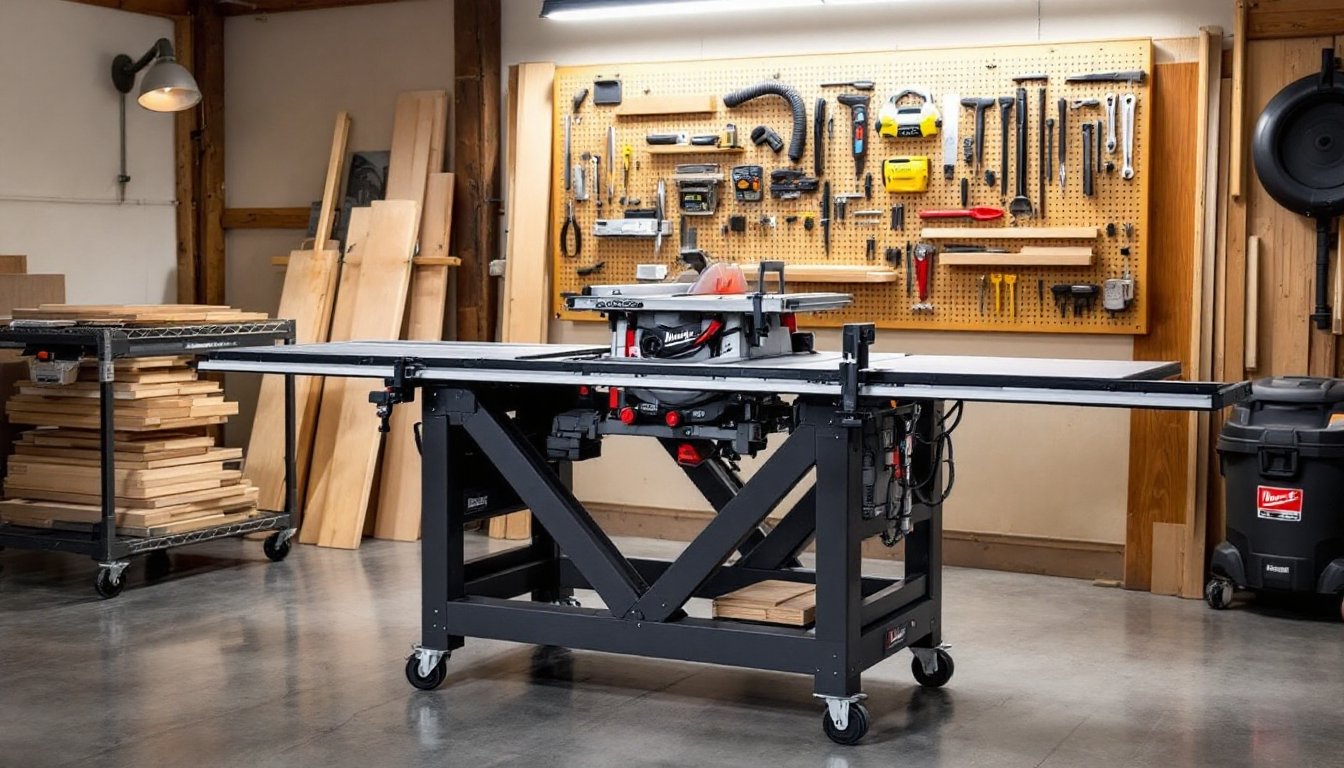
A table saw is only as good as the foundation it sits on. Whether you’re ripping boards for a deck or making precision crosscuts on cabinet panels, the stability, height, and mobility of your table saw setup directly affect both your accuracy and safety on every cut. A Milwaukee table saw stand transforms your portable saw from a jobsite tool into a legitimate workshop centerpiece, giving you the right working height, reducing vibration, and offering space for outfeed support and material storage. This guide walks you through what matters when choosing, setting up, and getting the most out of your stand, so you can focus on the work, not fighting your equipment.
Table of Contents
ToggleKey Takeaways
- A Milwaukee table saw stand provides the proper working height (34–36 inches), reduces vibration, and improves both accuracy and safety compared to basic setups.
- Folding mobile stands suit compact workshops with flexible space, while heavy-duty fixed stands deliver superior rigidity and precision for dedicated woodworking operations.
- Proper setup—including level flooring, squarely mounted saws, dust collection, and blade alignment—is essential before making your first cut.
- Quality stands feature adequate work surfaces, stable internal bracing, integrated outfeed support, and positive-locking casters for stability and mobility.
- Accessories like outfeed tables, organized blade storage, and dust collection ductwork maximize your stand’s functionality and workshop efficiency.
What Is A Milwaukee Table Saw Stand?
A Milwaukee table saw stand is a dedicated support frame or cart designed to hold a Milwaukee-brand table saw at a comfortable working height, typically around 34–36 inches (measured from floor to blade centerline). Unlike a basic workbench, a purpose-built stand is engineered to handle the vibration, weight, and lateral forces your saw generates during operation.
The stand’s primary job is to eliminate bounce and chatter that leads to inaccurate cuts and wastes material. A flimsy base also forces you to lean down or contort your posture, which causes fatigue and invites mistakes. Good stands include features like rigid bracing underneath, wide footprints to resist tipping, and surfaces that let you attach a fence, miter gauge, and outfeed tables. Many models also incorporate wheels or casters so you can tuck the saw away when space is tight, a major advantage in home shops where real estate is precious.
Wilwaukee stands vary from compact folding units designed for small garages to industrial-grade fixed stands meant to anchor a serious woodworking operation. Knowing which category fits your space and work style is the first step to a smarter workshop investment.
Types Of Milwaukee Table Saw Stands And Their Best Uses
Folding Mobile Stands For Compact Workshops
Folding mobile stands are the workhorses of small-space DIY shops. These lightweight frames collapse down to a fraction of their working size, stow in a garage corner or lean against a wall, and roll out on lockable swivel casters when you’re ready to cut. Most folding stands weigh between 50–70 pounds and cost less than fixed alternatives, making them a sensible entry point if you’re unsure whether a permanent saw setup justifies the real estate.
The trade-off is rigidity. A folding stand flexes slightly under load, not enough to ruin cuts, but noticeable if you’re pushing heavy material or making very fine furniture work. They’re ideal for framing, deck work, rough-outs, and general-purpose construction where ±1/16 inch variation isn’t a deal-breaker. Ensure the stand locks firmly once deployed: a wobbling base during operation is a safety hazard and a recipe for ugly results.
Heavy-Duty Fixed Stands For Permanent Setups
If your Milwaukee saw lives in a dedicated workshop and won’t move, a fixed stand is the right choice. These are heavier, typically 100+ pounds, with a lower center of gravity, welded steel frames, and bolt-down feet. A fixed stand absorbs vibration far more effectively than a mobile unit, which translates to cleaner crosscuts and rip cuts, especially on hardwoods or when using thin-kerf blades.
Fixed stands also provide more real estate for auxiliary surfaces. You can bolt an outfeed table behind the blade, mount a full-length rip fence extension, and incorporate dedicated spaces for tool storage, dust collection, and material staging. If you’re serious about joinery, cabinetry, or any work demanding repeatability and precision, this is your baseline. The downside: it’s a commitment. Once bolted down, moving it isn’t quick, so placement matters.
How To Set Up Your Milwaukee Table Saw Stand Safely
Before you bolt anything down or plug in the saw, spend time on prep. Safety and accuracy both hinge on foundation work that feels tedious until you realize how much it improves your results.
1. Choose your location. Pick a spot on level floor, ideally concrete or solid hardwood, not carpet or uneven subflooring. Uneven surfaces amplify vibration and throw off blade alignment over time. If your workshop floor isn’t level, use shim wedges under the stand feet to bring everything dead-level (check with a 2-foot level in multiple directions).
2. Assemble the stand per the manual. Don’t skip steps or substitute bolts. Folding stands especially need every hinge pin and locking mechanism in place before you load a saw onto them. Tighten everything firmly, but don’t over-torque fasteners: you want them snug, not stripped.
3. Mount the saw squarely. Place the saw centered on the stand, with weight distributed evenly. Secure it with the mounting brackets provided, these prevent the saw from sliding or tipping if you accidentally bump it or apply lateral pressure during a cut.
4. Install dust collection. Attach your dust chute or hose before making any cuts. Sawdust buildup reduces visibility, clogs your motor, and becomes a fire hazard over time. A shop vac with a table saw adapter pulls chips away from the blade area and keeps your lungs cleaner.
5. Level and align the blade. Check that the blade sits perpendicular to the table surface (use a combination square or blade-alignment jig). Run the saw empty for 10–15 seconds to listen for unusual sounds, grinding or dragging means something’s misaligned and needs attention before you rip a board.
Wear safety glasses and ear protection during all operations. Keep hands at least 6 inches from the blade, and never reach over a running blade, always stop the saw and wait for the blade to fully coast to a stop.
Essential Features To Look For In A Quality Stand
Not all stands are equal. A few key features separate a stand that makes you a better woodworker from one that holds a saw and nothing else.
Adequate Work Surface: Look for a stand with a flat, expansive top or one designed to accept bolted-on extensions. Your saw’s table is small by design: you need support on both sides of the blade to run long boards safely. A stand that gives you a 48-inch rip width without rigging plywood extensions is worth the money.
Dust Collection Compatibility: The best stand comes with or accepts a dust port that feeds directly into a shop vac. Stands that force you to improvise an adapter with duct tape and desperation aren’t doing their job. Poor dust collection means cleaning your workshop constantly and choking your motor with chips.
Stable Bracing Underneath: Look at the frame. If you see welded gussets in the corners and diagonal bracing that locks the frame into a rigid triangle, you’ve found a solid design. Stands with minimal internal bracing might feel fine at first, but vibration increases over time as fasteners loosen slightly.
Integrated Outfeed Support: The best stands include a bolted table or a threaded insert arrangement on the back so you can add a sliding outfeed table for longer boards. This is especially critical for table saws because a 12-inch outfeed (a table extending behind the blade) is standard in woodworking to support the trailing end of a board and prevent binding.
Mobility and Locking: If you’re considering a mobile stand, ensure the casters lock positively. Cheap swivel casters spin freely even when locked, turning your stand into a skating rink during operation. Ball-bearing casters with positive locks resist movement much better.
Maximizing Your Workspace With Stand Accessories And Organization
Your stand is the anchor, but accessories transform it into a true power tool hub. Resources like Popular Mechanics frequently highlight workshop layouts that pair tool stands with strategic storage, and the principle is simple: proximity and visibility save time and keep your space functional.
Material Staging: Set up a small cart or shelving unit next to the stand to hold rough lumber. This keeps materials at arm’s reach and prevents you from stacking boards on the workshop floor, where someone could trip. A rolling cart works especially well in tight spaces because you can shove it aside when the saw isn’t in use.
Blade and Accessory Storage: Hang a pegboard or magnetic strip behind or beside the stand to keep blades, wrenches, and push sticks visible and instantly available. A dull blade sitting in a toolbox for three weeks is a dull blade you forget you have. Organized storage eliminates that friction.
Outfeed Table: Building a sliding outfeed table is one of the highest-value upgrades you can make. Platforms like Instructables host detailed plans for outfeed tables that bolt to most stands and slide on wooden cleats. This lets you rip 8-foot boards without them sagging or binding at the back of the blade. For a fixed stand, this is nearly essential: for a mobile stand in a small shop, a removable outfeed extension you store elsewhere is a practical compromise.
Dust Collection Ductwork: Run a 4-inch flexible hose from the stand’s dust port to your shop vac, securing it with zip ties so it doesn’t flail around. Route it overhead or along the wall to keep it out of your work path. A well-designed dust system also means you’ll actually use it, cleanup is easier, which means you’re more likely to tidy up between projects.
Edge Banding and Trim Storage: If your stand has room underneath or on a nearby cart, dedicate a few drawers or bins to sandpaper grits, edge banding, and fasteners. Having these consumables organized and close to your cutting station cuts project setup time from 20 minutes to 5.